Johan Ronsse

  • Home
  • Projects
  • Blog
  • Sim racing (3)

    September 21, 2019 - Posted in games simracing

    Zie de vorige delen in deze reeks:

    • Sim Racing (1)
    • Sim Racing (2)

    Nooit gedacht dat een nieuwe hobby zo’n blijver ging zijn. Na het uitgebreid testen van Assetto Corsa 1 was ik op een bepaald moment de ongebalanceerde AI van het spel een beetje beu en keek ik naar andere horizonten.

    Zelfs met de hulp van de hoofd-developer van Kunos zijn YouTube video’s (#1, #2) lukte het mij niet om bepaalde stukken in de career mode te verslaan. Online vond ik ook klachten over de ongebalanceerde career mode op de PS4-versie. Ik heb wel wat vermogen om iets een aantal keren te proberen maar er is ook een grens. (Misschien lag het ook gewoon aan mijn skills.)

    Logische 1e test was Assetto Corsa Competizione: een spel voor PC, dus hup, de sim racing setup verhuisd van “het salon” (beneden) naar mijn werk bureau. Mijn collega’s hebben een paar weken een PlaySeat in de achtergrond zien staan. Zeer professioneel, dat.

    Met dat ik eindelijk terug een computer heb waar je effectief een stukje op kan gamen, begon ik eraan. Mijn ACC ervaring was interessant getimed met de real-life F1 races van Spa Francorchamps en van Monza, twee circuits die ook beschikbaar zijn in het spel.

    Het spel is grafisch impressionant, de nachtraces zijn cool en het spel zit over het algemeen interessant in elkaar. Maar er miste iets. Ten eerste was het minder fijn gamen dan op mijn TV + PS4. Ten tweede was het opeens wel heel – heel moeilijk. Dus dan besloot ik: misschien moet ik maar eerst beter leren racen in een andere klasse.

    Simracende vrienden spreken lovend over iRacing. Dus, ik aan de iRacing. Na een web formulier dat precies uit 1998 kwam ingevuld te hebben op een redelijk verdacht uitziende website en 12*3 dollar (denk ik) te hebben overgemaakt via PayPal voor 3 maanden iRacing kon mijn iRacing ervaring beginnen. Het begint met een MX5 op Laguna Seca. In oefenmode, zodat je “iRating” niet omlaag gaat. Ik ging een keer in een practice race en botste tegen iemand en werd direct naar het hoofd geslingerd dat ik de track offline moest leren. Euh, OK, ik dacht dat deze lobby “practice” noemt for a reason? iRacers don’t mess around.

    Laguna Seca is een leuk circuit en de MX5 is een fijn karretje maar wel iets heel anders als je van de group 3 auto’s komt. Dat was leuk voor even maar na de 40e ronde keek ik ook eens naar iets anders.

    Als ik dan eens keek naar wat voor anders er in het spel zat, dan kwam ik vooral veel content tegen die €15 het stuk kostte. Een Ferrari voor €15 hier, een track van €15 daar – allemaal misschien legit als het laser scanned content is die nergens anders verkrijgbaar is, maar als beginnende sim racer heb ik nog veel te verkennen – in andere games waar ik al voor betaald heb.

    Ik was ook super unimpressed door het Silverstone circuit in iRacing. En eigenlijk over de graphics in het algemeen. En de randomness van de base content. Ik ben echt niet geïnteresseerd in van die NASCAR achtige circuits. De force feedback was ook niet echt je dat (ik heb nu geleerd dat het een setting is… dus later nog eens testen). Dat was de druppel om terug te switchen van game. (Wees gerust R., ik geef het later nog een kans!)

    Dus, eerst terug naar Assetto Corsa Competizione. Na ongeveer de helft van de career mode gespeeld te hebben (klinkt uitgebreid maar na 2-3 avonden zit je daar al) een aantal conclusies. Ten eerste, het is leuk om een circuit als Zolder te leren, dat is in het echt in de buurt, en het is goed je circuits te kennen voor toekomstige real-life ervaringen. Twee, als je een track van één spel kent dan kan je het makkelijk in een ander spel toepassen (de Hungaroring reed ik al in F1 2018). Ten derde, Misano World Circuit is een erg cool circuit. Na 5 rondjes kwam die al in mijn top circuit lijst*.

    Maar weer bekroop me het idee dat ik een beetje aan het sukkelen was en dat ik op een andere manier beter kon worden. Ook de online kritiek op ACC deed er geen goed aan om verder te investeren in dit spel.

    Vrienden raden me al eens “one track, one car” aan. Zijnde dus dat je zo lang mogelijk 1 circuit met 1 auto moet oefenen. Dat klopt tot op een zekere hoogte, maar ik argumenteer daar ook tegen dat dat gewoon veel te saai is.

    Ik heb een beetje variatie nodig of het is niet interessant. Voor mij zit er ook veel plezier in tracks en auto’s leren kennen. Zo heb ik een rare fascinatie gekregen voor wat ik vroeger als johnnybakken beschouwde. Dus, beste vrienden & familie, als ik opeens in een getunede VW Sirocco kom aanrollen: blame simracing.

    Er zijn ook veel mensen die claimen dat je eerst met een lagere klasse moet leren rijden om met een hogere klasse te kunnen rijden. Dat is wellicht correct en goedbedoeld advies, maar het is ook een game, het moet een beetje plezant blijven. Liever een Huracan “onder mijn gat” dan een Renault Clio. En in mijn ogen word je door met een Clio te rijden enkel maar beter in met een Clio rijden…

    Na een zondagse sim racing sessie met een makker waar ik nog eens Assetto Corsa 1 had opgestart vond ik de variatie die ik zocht terug: driften met een AE86 op een landweggetje. Een MX7 race op Imola. Scheuren met een Ferrari 488 op de old-school layout van Monza. Jaaa! Hier kan ik enthousiast van worden.

    Dit in combinatie met enkele YouTube video’s van de kanalen die ik ondertussen volg — David Perel (aanrader!), Jimmy Broadbent, EIRISS en Super GT — bracht me terug bij een game die ik eigenlijk al 2 jaar geleden had gekocht: Gran Turismo Sport.

    In een oud interview met de makers ging het erover dat zij de game zagen als een ervaring die mettertijd zou groeien, en dat ze van het principe waren dat ze mensen konden leren racen via het spel. Met dit en de enorme variatie die dit spel te bieden heeft in het achterhoofd gaf ik het een nieuwe kans.

    Ik heb Gran Turismo altijd te “arcadey” gevonden en nooit echt beschouwd als een simulator, maar hier moet ik me dus corrigeren. Het is effectief een simulator, en zelfs een behoorlijk verregaande (ook hier pro tip: zet de force feedback op maximum!)

    Het zit gewoon in een commercieel gelikt jasje waardoor je in de indruk hebt dat het heel toegankelijk is. Dat is het ook, maar om toptijden te halen, online races te winnen en (in de single player mode) alle “gouden bollen” te verzamelen zal je als racer serieus zweten.

    Je hebt in Gran Turismo, net als in iRacing, het concept van een “safety rating” en een “driver rating” (Ik denk dat het in iRacing een gecombineerde rating is). Je gedraagt je dus maar beter op het circuit of je zal laag ranken. En laag ranken betekent: racen tegen mensen die het een goed idee vinden om er een botsauto feest van te maken. En da’s net niet plezant.

    Vanaf je in Gran Turismo een beetje betere tijden dan de gemiddelde persoon haalt, dan begint het plezierige deel. Dan ben je aan het racen tegen mensen met hetzelfde niveau. Nek aan nek races waar je strategisch moet bekijken waar je juist remt, hoe je rempunt verschuift omdat je in de slipstream zit, hoe je een andere lijn volgt op het circuit dan anders om strategische race redenen,… het is uitgebreid en plezant. Ik heb na wat effort een 3e plaats gehaald in een online race en dat voelde aan als een achievement.

    Nu hoop ik ooit wel eens eerste te zijn… maar daar is dus nog werk aan. Ik zie mijn skills beetje bij beetje evolueren. Ik zal me troosten met het feit dat Nico Hülkenberg als 170 keer op de F1 grid is gestart en nog nooit gewonnen is. De aanhouder wint.

    Daar ben ik dus momenteel mee bezig. Het is iets raars, dat racen. Het is eigenlijk veel dieper dan je zou denken. En het is spannend en interessant als je er wat meer over weet. Voor mezelf, voor binnen zes maand, twee recente records waar ik wel blij mee ben:

    • GT Sport – Red Bull Ring – Huracan (Gr3) – 1:30:841
    • GT Sport – Nordschleife – BMW M6 (Gr3) – 6:56:352

    Ik heb nogal eens de neiging om van hobby’s te wisselen. Gaat deze hobby een blijver zijn? Voorlopig denk ik van wel. Deze sim racer groet u.

    *De Lijst, momenteel:

    1. Red Bull Ring
    2. Misano
    3. Mugello
    4. Spa Francorchamps
    5. Imola
    6. Silverstone
    7. Nurburgring GP
    8. Nordschleife
    9. Autopolis
    10. Hungaroring
  • Skilliverse demo

    September 16, 2019 - Posted in data-visualisation development svelte

    A demo I made of my “skilliverse” app that I made with Svelte.

  • Improving my programming skills

    September 14, 2019 - Posted in computers development interface javascript side-projects svelte

    Somewhere this year I started a journey to learn some more Javascript, mostly triggered by wanting to reach a next level in terms of user interface. In August the learning suddenly accelerated fast, mostly by getting excited about Svelte and finding myself with some extra time on my hands for the first time in a long time.

    I built a few demos and things got rolling. I built work upon other work and was happy with the results which motivated me to work more and more.

    View this post on Instagram

    #sideproject #svelte #radarchart #programming #ipad

    A post shared by Johan Ronsse (@wolfr_) on Aug 26, 2019 at 6:39am PDT

    I’ve learned a bit of Javascript over the years, mostly some jQuery things to manipulate the DOM and some practical knowledge like how to work with certain plugins like HighCharts or Select2. I think I even once wrote a (poorly architected) plugin. But I have never really learned the basics since I have never really needed them. I’ve been vaguely aware of the different string manipulation methods and how to call events to do something with the DOM and I could do something relatively standard like implement a library and then maybe change it a little bit, but nothing more than that.

    I’ve hacked away on our prototype project Bedrock occasionally over the past few years but this was mostly modifying code that someone else wrote. I’ve always been enchanted by the idea of node.js — with the possibility of being both server & client — and the fact that it can access the file system.

    This makes me feel like I has the possibility to write “real” apps as most of the professional things I want to do involve automation and that in turn needs a lot of file handling. I never got to that of course as my focus is on UI design.

    In general I’ve kept away from writing too much JS in my day job for the past years, mostly focussing on the UI designs themselves and delivering well-architected HTML and CSS to help the developers on their way to build the entire UI in a full stack environment (And now coaching others to do so as well)

    I also don’t like spending hours on something when I know that I will be inefficient at doing it. I would rather leave the JS work to the persons who I always jokingly call the “real programmers”.

    I want to change that and start writing more JS in my day to day. First of all I feel like I reached a knowledge level where I have similar skills as the “real programmers” anyway. It’s not a competition BTW, that’s just an observation for myself to feel certain enough to do programming types of tasks in a (paid) project context. In the end we have to work together to make great products.

    Next to that our team is growing and there are more people with more skills in it that can also teach me a thing or two about modern JS.

    We’re not going to turn into a development company overnight now. We’ve always been designers that use code as a means to an end – to explain an interaction, to show what is possible responsively.

    I just feel like I just need to know more about manipulating what’s on the screen in a programmatic way to reach a next level in UI. You can only do so much if you stick to HTML and CSS. At some level I also feel like the standardista’s I grew up with are holding on to 10-15 year old opinions that are no longer valid, because the world has moved on, but that is another discussion in itself.

    I’ve always liked stuff like D3.js – there are things like MapBox that I can geek out about – there’s plugins for Figma – there’s two.js and Zdog – and I’m excited by the possibilities of web components.

    What all of the things above have in common is that they are Javascript-heavy. I feel like I need to be smooth at manipulating it in order to create what I want to create.

    The timing feels right to improve my level of Javascript. The market need is there to have a better deliverable (i.e. a web components based one). The resources to learn it properly are out there too, now. A few years ago you’d be hard pressed to find a decent Javascript course. Now there are tons of resources out there.

    Now, about learning Svelte specifically. Svelte was quite difficult to grasp in the beginning of the year. I tried to get into it in February but it just wasn’t finished in terms of documentation and external resources.

    Things are better now, with much improved documentation. Some of the demos on the REPL are really impressive (I love this tree for instance). One problem I encountered for now is there’s not many resources about Svelte out there. There are plenty of React courses but for Svelte there is just this one course, that’s apparently not very good because it teaches you to think too much in React-style coding.

    In order to counter this I’ve been patching bits and pieces of thinking together to get to an understanding, documenting things along the way for myself, both publicly and privately. I’ve changed my mindset about how I should learn to code – not by listening to a video tutorial but by doing, reading other people’s code, and documenting how I solved the problems. If you have to wait for an external resource to explain eloquently why you need to do things a certain way you will always be behind the curve.

    Moreso, these isolated examples can help our company grow as a team.

    So that’s a bit about my recent programming experiments/learnings/process. I hope I can inspire someone to do something similar or that some of the thoughts or references in this post get you thinking.

  • Svelte screencasts

    September 7, 2019 - Posted in development javascript svelte

    I made some screencasts showing how to implement components in Svelte.

    • Implement a Card component with Svelte 3
    • Implement a Table view with Svelte 3

    I am working on a UI framework/method to rapidly prototype interfaces. As I build it I thought I would strategically record certain parts so our team and others can learn alongside with me.

    We built Bedrock before which we use daily and is super powerful, but has its downsides. But that is food for another blogpost.

  • Overengineered packages?

    September 6, 2019 - Posted in css development javascript npm react - 1 comment

    Is a package like classnames “overengineered”? I stated on Twitter that a package called classnames felt overengineered to me. I based myself on the npm page where this code example is given:

    var btnClass = classNames('btn', this.props.className, {
      'btn-pressed': this.state.isPressed,
      'btn-over': !this.state.isPressed && this.state.isHovered
    });

    The first reason I felt this was overengineered was because this kind of code actually belongs in CSS:

    .btn:hover { /* Styles */ }
    .btn:active { /* Styles */ }
    .btn-pressed { /* Used as .active I presume */ }

    I understand why giving something a class conditionally might be handy, but do you really want people to figure out that a button should have a class of btn-overwhen the state is not pressed but hovered?

    And then have that match up to another logic on the CSS side?

    Bramus and Sebastian rebutted that it’s actually a very handy utility. So I am sure there are situations I am not aware of where it might be handy.

    At the moment I feel like it’s only invented because of a deeper problem: trying to write CSS in Javascript.

  • Figma plugin shortcuts

    September 5, 2019 - Posted in figma workflow

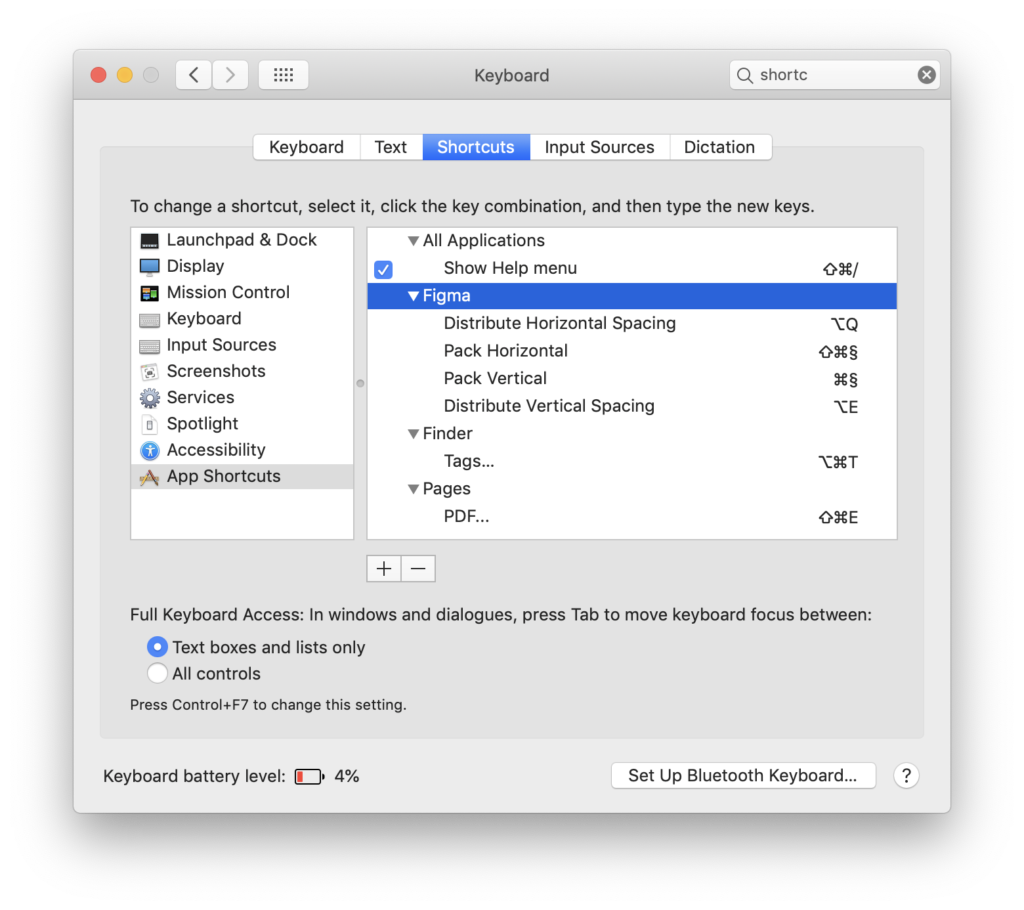
    The shortcut to run the last plugin in Figma is ⌥ ⌘ + P.

    Alternatively you can use ⌘+/to bring up the global command menu and type the name of the plugin.

    You can also set up a custom shortcut in MacOS’s Shortcuts panel based on the plugin name. I didn’t do this yet in the screenshot below, but you if you use the exact menu item name, it should work.

    What I did however was set up shortcuts for Pack Horizontal and Pack Vertical. I use these commands all the time to quickly build designs.

    Interested in learning to work with Figma in a better way? I organise Figma workshops with Mono, the company I founded and work for. You can read more info here. Sign up to the newsletter if you want to be the first to know when we announce dates for new public workshops. Spaces are limited!

  • To caps or not to caps?

    September 4, 2019 - Posted in accessibility

    Zoals zo vaak wordt een blog post getriggerd door een tweet. En een tweet door een gedachte.

    Roel, die ik persoonlijk al vele jaren ken, vertelde ons een paar weken geleden in een professionele context (een excellente audit door zijn bedrijf 11ways) dat het opletten is als je tekst in uppercase zet in je interfaces.

    Het zou dan wel eens kunnen dat een schermlezer het als een afkorting beschouwt. Ik ben sowieso niet echt fan van uppercase tekst, maar als decoratief element in een kort tekstje kan het vormgeeflijk soms wel voor mij.

    Maar dan heb je dus het risico dat een schermlezer een TAGNAME uitleest als T-A-G-N-A-M-E en dus alle letters apart leest, alsof TAGNAME een afkorting is. Hetzelfde geldt voor exotische ASCII karakters, maar daar is het nog erger: dan krijg je als je een schermlezer gebruikt gewoon een hoop onverstaanbare karakters te horen. Het zou zelfs gelden voor tekst die met CSS uppercase gemaakt wordt ( text-transform: uppercase).

    Nu, persoonlijk denk ik dan ergens dat de makers van schermlezers hun software moeten fixen – dat als in de broncode geen caps staan dat ze het dan ook niet uitlezen. Maar zolang een populaire schermlezer die fout bevat, is het wellicht beter om niet te veel tekst in caps te zetten. Wat op zich weer een goede vormgeeflijke tip is.

  • Svelte: dynamic CSS classes

    September 2, 2019 - Posted in svelte - 1 comment

    I might start writing some blog posts to keep up with learning Svelte. I wrote this one, more might follow, but I am not promising anything ;).

    The first topic of today is :class.

    Take a look at this code, we add a class of .blue when foo is true:

    <script>
       var foo = true;
     </script>
     <style>
       .blue { color: blue; }
     </style>
     <h1 class="blue {foo ? 'foo': ''}">Hello world</h1>

    This code works but it’s not very Svelte-ish.

    In Svelte you can dynamically add a class based on, for example, whether a Javascript variable is true or false.

    For example

    <script>
      var foo = true;
    </script>
    
    <style>
      .red { color: red; }
    </style>
    
    <h1 class:red="{foo}">Hello world</h1>

    Now, you can also combine a regular class with an “optional class”:

    <script>
       var foo = true;
     </script>
    
     <style>
       .red { color: red; }
       .blue { color: blue; }
     </style>
    
     <h1 class="blue" class:red={foo}>Hello world</h1>

    Here is a real life example of this in practice:

    In App.svelte:

    <script>
         import Button from './Button.svelte';
     </script>
     <Button>Hey</Button>
     <Button variant="primary">Hey</Button>
     <Button variant="success">Hey</Button>

    In Button.svelte:

    <script>
         export let variant = null;
     </script>
     <style>
         .button { padding: 0.5rem; }
         .primary { background: #748DD5; border-color: #748DD5; color: #FFF; }
         .success { background: #75D37E; border-color: #75D37E; color: #FFF; }
     </style>
     <button
       class="button"
       class:primary={variant==='primary'}
       class:success={variant==='success'}
     >
         <slot></slot>
     </button>

    See this REPL for an example.

  • Basecamp keeps banging the same drum

    July 23, 2019 - Posted in Uncategorized

    Jason Fried writes, in the foreword to Shape Up:

    Over the last few years, there’s been a heightened curiosity about how we work at Basecamp. People often ask us how we get so much done so quickly at such a high level of quality with such a small team. And how we keep our teams together for years and years.

    I got a bit irritated by this, and the style of Basecamp’s communication in general. They’re always putting themselves on this pedestal of “we are so awesome”, when in reality their application is severely lagging behind the competition.

    When they invent something it’s always the next best thing. I wrote about some of my frustrations with Basecamp before. When I initially read this statement I channeled my thoughts into some tweets which now formed the basis of this blog post.

    I am increasing irritated by Basecamp’s communication strategy. I feel like you can’t play the underdog for 15 years. We’ve been a Basecamp customer for a while and over time I saw the product mostly get worse instead of better.

    Last year we dumped $900 in the bucket for a year’s subscription to Basecamp but then, Notion happened, and we just moved on to software that is essentially just better. I haven’t touched our Basecamp account for months.

    I used to be a big Basecamp believer for a very long time, but the product is stagnant and totally being disrupted. I am writing this blog post in Notion’s editor that is quite awesome, works with markdown, in an app that is lightning fast, that we use to manage our company.

    Basecamp is stuck in a reality of 10 years ago and happily chugs on writing blog posts about how they struggled to implement a grouped list within their self-imposed limits.

    I just wonder, how long can you hold on to a set of beliefs that is just no longer true? Basecamp is using the same marketing techniques as they did 13 years ago. I read “Getting real” in 2006. Since they formed 37signals have condensed their internal beliefs into content marketing.

    I’ve been a big believer and have championed the company as one of my favorite companies in the past. But I’ve grown increasingly frustrated with them banging the same drum. Having access to the kind of resources that Basecamp has you just can’t keep playing the underdog.

    I believed their statements about product design when the product was evolving, but over the years they’ve focussed on things I don’t care about (hill chart anyone? The weak chat within Basecamp?), didn’t evolve on what they claim is super important (speed), and even did poorly when it came to basic UI (oh that breadcrumb UI).

    Over time, the product got more expensive while the overall experience got worse. The editor is still the same lightweight thing that doesn’t meet my needs. Integrations are nonexistent. The app ignores the 2019 fact that you are also using other apps. Ever tried linking a Google doc to Basecamp? Welcome to the past. Basecamp 3 feels like an app from 2012, not 2019.

    I don’t care how many people it takes to build a better product. I don’t really care that they make their feature sprints 6 weeks. What I want is the better product. Not an explanation of how they were “so lean” and only have 1/2 the feature.

  • Boekenlijst

    July 13, 2019 - Posted in Uncategorized - 2 comments

    Ik dacht — met een vakantie die er aan komt — misschien moet ik nog eens een boek lezen?

    Ik heb al wat non-fictie op een lijstje staan:

    • Gigantisme – Geert Noels
    • Click here to kill everybody – Bruce Scheiner
    • Waarom de wereld niet naar de knoppen gaat – Maarten Boudry

    Misschien moet daar wel iets van fictie bij? Ik vond Normal People van Sally Rooney wel OK.

    De laatste jaren heb ik soms een poging gedaan om iets van sci-fi te lezen (dingen van Ann Leckie of Neal Stephenson) maar ik geraak daar dus helemaal niet door. Geef mij dus maar iets dat zich afspeelt in de echte wereld.

    Wie heeft er aanraders?

← older
newer →
  • ©2026 Johan Ronsse
  • X
  • Bluesky
  • Mastodon
  • Portfolio 2024